
Most women who try to fix their finances start with a budgeting app, use it for eleven days, and quietly delete it. A smaller number build one free budget spreadsheet, keep it open every few days, and know their exact number by the fifth of the month. The difference isn’t discipline. It’s whether the tool actually matches how they live.
If you’re a woman trying to get a real handle on where your paycheck goes in 2026, whether you’re managing money solo or for a whole household, this is Maya Collins for PennyToPower.com. Below is a free budget spreadsheet for beginners built to actually get used, plus a working copy you can download and start filling in today.
A free budget spreadsheet works because it puts your income, monthly bills, and daily spending in one place with formulas that total everything automatically. Below, you’ll see how to set it up, pick the version that matches how you get paid, and download a working copy to start using today.
Why “Just Make a Budget” Never Actually Works
“Just make a budget” is the most repeated, least useful sentence in personal finance. It assumes everyone gets paid the same way, spends in the same categories, and has the patience to build a system from a blank page. Most budgeting apps default to generic categories that don’t match anyone’s actual life: a “dining” category that lumps your kid’s school lunch money in with a birthday dinner out, or an “other” bucket that quietly absorbs a third of what you spend.
The templates people abandon usually fail for one of two reasons. Either the categories don’t fit how they actually spend, so nothing adds up right and they stop trusting it. Or the setup assumed one steady paycheck, and their income doesn’t work that way at all. A spreadsheet only earns daily use if it bends to your situation instead of the other way around.

Building Your Own Free Budget Spreadsheet From Scratch
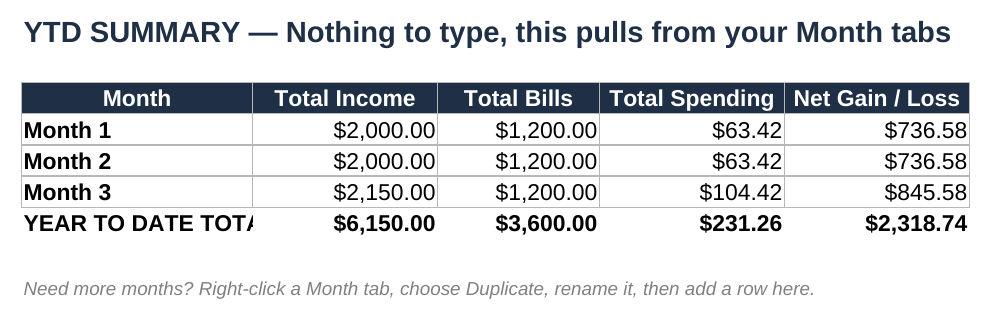
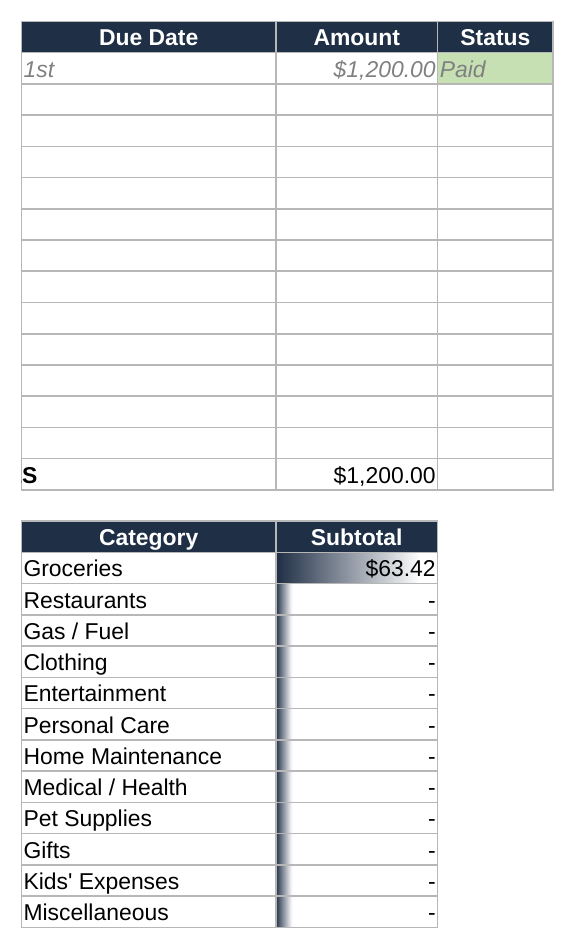
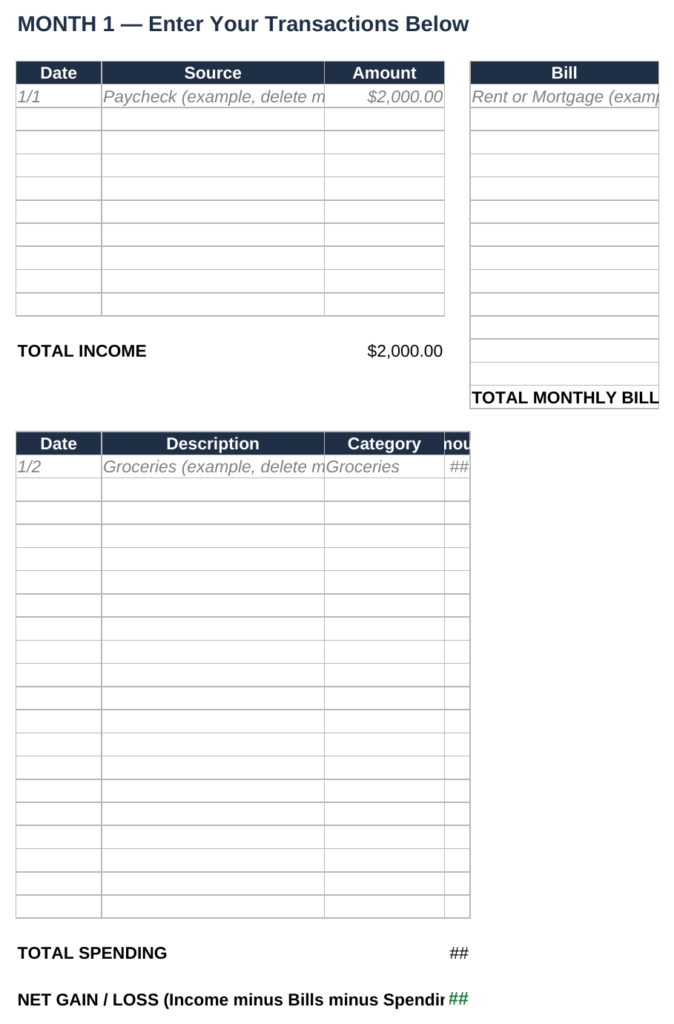
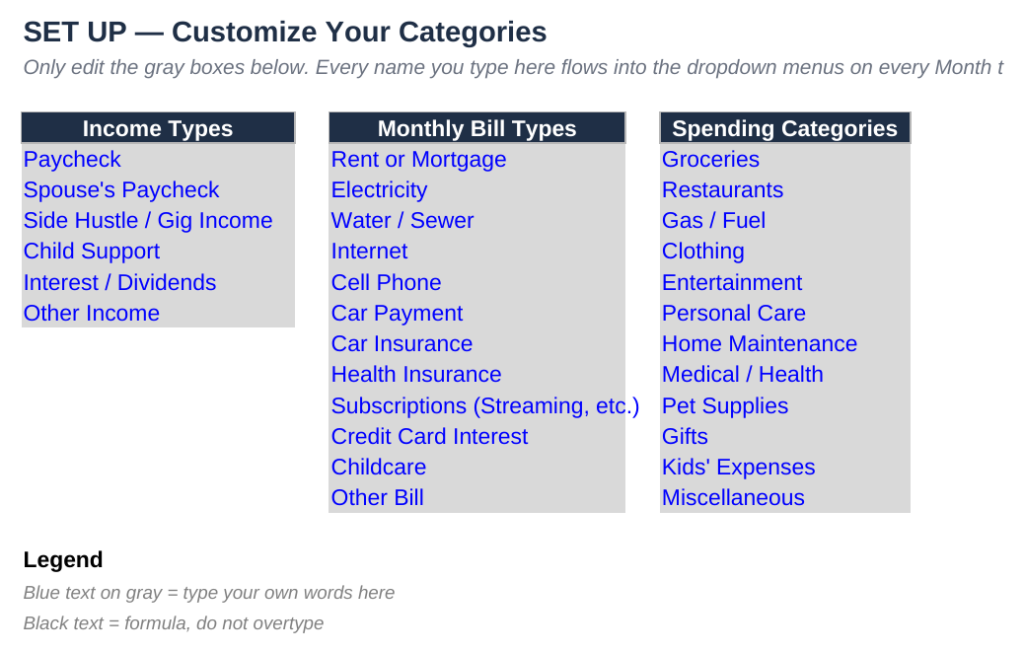
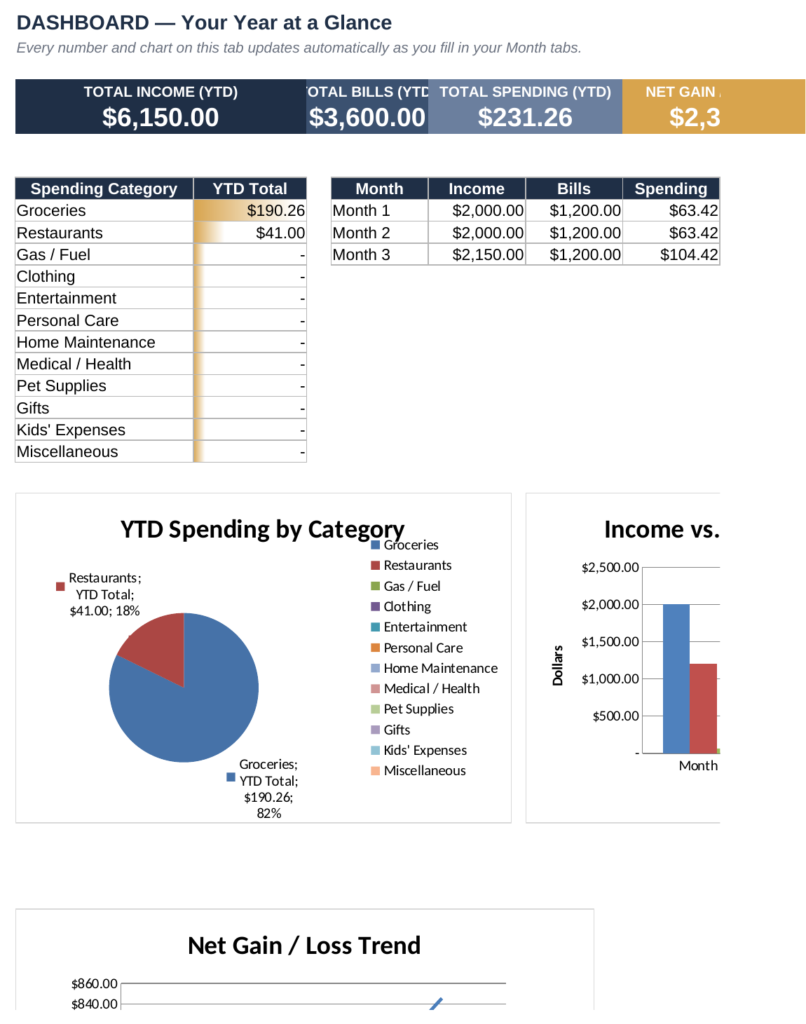
The version below is built around three tabs that do the math for you. A SET UP tab holds your custom income types, bill names, and spending categories, type them once and they show up as dropdown menus everywhere else in the workbook. A Month tab is where you actually log transactions: income on one side, monthly bills on another, and daily spending below that, with running totals calculated automatically. A YTD SUMMARY tab pulls the totals from every month into one place so you can see your year at a glance without adding anything up by hand.

You only touch the gray boxes. Everything else is a formula, and it recalculates the moment you add a new transaction.
Your Free Budget Spreadsheet: Two Paths Depending on How You Get Paid
Not everyone should set this up the same way, so here’s where it splits based on your actual income.
If You Get a Regular Paycheck
Enter your paycheck amount and date in the Income table once each payday. Because the amount barely changes, your Total Income cell becomes a reliable number fast, usually within one full pay cycle, which makes your Net Gain or Loss figure the most useful thing on the page.
If Your Income Changes Month to Month
If you freelance, drive for a delivery app, or bring in side income on top of a job, log every deposit as it lands instead of waiting for a “typical” month that doesn’t exist. Your free budget spreadsheet total income will bounce around more, and that’s expected. Comparing it against your Total Bills number (which stays fairly fixed) tells you the minimum you need to bring in every month just to break even.

What Tracking Every Dollar Actually Shows
Here’s the honest reason this matters beyond feeling organized. According to the Federal Reserve’s 2025 Survey of Household Economics and Decisionmaking, 63 percent of adults said they could cover a surprise $400 expense using cash or its equivalent, which means more than a third could not. A spreadsheet like this doesn’t fix that gap by itself, but it’s the fastest way to see exactly where the flexible part of your money is actually going before an emergency forces the question.
| What You’re Tracking | What It Covers | What Tends to Surprise People |
|---|---|---|
| Monthly Bills | Rent or mortgage, utilities, insurance, subscriptions | How many small recurring charges quietly renew each year |
| Daily Spending | Groceries, gas, restaurants, personal care | This category is generally the one people underestimate the most once every transaction is logged |
| Net Gain or Loss | Income minus bills minus spending | Whether “breaking even” is actually true, or just felt true |
A HYSA, or high-yield savings account, is a savings account that pays a meaningfully higher interest rate than a typical checking account. It’s worth knowing that term because once your spreadsheet shows a real monthly surplus, that’s usually the next conversation worth having with yourself.
For anyone who wants the deeper case for why this cushion matters, this honest breakdown of emergency fund myths is worth reading next.

What Changes Once You Can See Where the Money Goes
Nothing about the spreadsheet forces better decisions. What it does is remove the guessing. Most women who start using something like this stop being surprised by their own bank balance within the first month, not because their spending changed yet, but because they finally know the actual number instead of an anxious estimate.
It won’t fix an income that genuinely isn’t enough to cover the bills, and it won’t replace a real conversation about a raise, a side income stream, or a bigger financial decision if that’s what’s actually needed. What it does is tell you, clearly, which of those conversations you need to have.
One Spreadsheet, Started Today
You don’t need to fill in twelve months before this is worth using. Fill in one week of real transactions, and you’ll already know more than you did before you opened it.
Six months from now, the version of you who started this week will have a full year of Net Gain and Loss numbers to look back on, and the version of you who waited will still be estimating. That’s the entire case for opening a free budget spreadsheet today instead of the next time you feel motivated.
People Also Ask
Is this free budget spreadsheet really free to use?
Yes. There’s no purchase, no email-gated upsell version, and no premium tier. The full working file, formulas included, is available to download below at no cost.
Does the free budget spreadsheet work in Excel, or only Google Sheets?
It’s built as a standard .xlsx file, so it opens directly in Excel with every formula intact, and you can also upload it into Google Sheets if you prefer working there.
How long does it take to update the spreadsheet each week?
Most people spend about ten to fifteen minutes every two to three days entering transactions from a bank or credit card app, rather than doing it all at once at month’s end.
What if my income changes every month?
Log every deposit as it arrives instead of estimating a typical month. Comparing your actual Total Income against your fixed Total Bills each month tells you the real number you need to break even.
Can I use this free budget spreadsheet without a Google account?
Yes. Since it’s a standalone .xlsx file, you can use it entirely in Excel or any spreadsheet program that opens .xlsx files, no Google account required.